al-mo.de › mcl
Every Claude Code login.
One command.
Stop logging out and back in. mcl gives each account its own isolated config, history and settings — and runs them side by side.
uv tool install git+https://github.com/mkalmousli/multiclaude
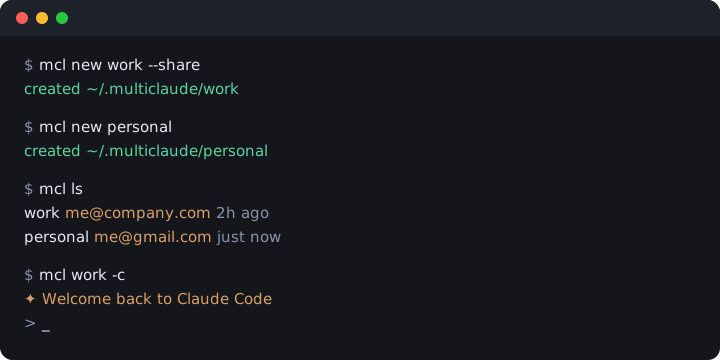
Manage multiple Claude Code accounts without logging out
Truly isolated
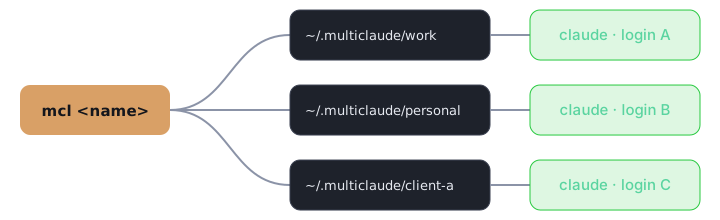
Separate login, history and settings per instance via CLAUDE_CONFIG_DIR. Nothing leaks between work and personal.
Side by side
Run two accounts in two terminals at the same time. No logout, no lost context.
Share what you want
--share links your settings, CLAUDE.md, commands, agents and skills while logins stay private.
Drop-in
Every claude flag passes straight through. mcl work -c just works.
See everything
mcl ls shows each instance, its account email and when you last used it.
Zero dependencies
Tiny, pure Python, MIT licensed. Linux, macOS and Windows. Installs in seconds with uv or pipx.
How mcl isolates Claude Code logins
Frequently asked questions
Can I use two Claude Code accounts at once?
Yes. Each mcl instance sets its own CLAUDE_CONFIG_DIR, so you can run different logins in different terminals simultaneously.
How do I switch Claude Code accounts without logging out?
Create an instance per account with mcl new work, then start it with mcl work. Each one keeps its own login, so there is nothing to switch.
Does mcl share settings between accounts?
Only if you ask. mcl new name --share links settings.json, CLAUDE.md, commands, agents and skills from ~/.claude. Logins and history always stay separate.
Where does mcl store my data?
In ~/.multiclaude/<name> by default. Set MULTICLAUDE_HOME to change it.
Is mcl free?
Yes, fully free and open source under the MIT license.
Which platforms are supported?
Linux, macOS and Windows with Python 3.9 or newer.
Is mcl affiliated with Anthropic?
No. It is an independent open-source tool that launches the official claude CLI.